
Promises vs. Observables: A Clear-Cut Exploration in Angular
In the world of Angular development, handling asynchronous data flows elegantly and efficiently is crucial. Promises and Observables both offer great solutions for managing asynchronous data, but they live in different worlds. In this blog post, we will embark on a journey to demystify Promises and Observables and their use in Angular applications.
Understanding Promises in Angular
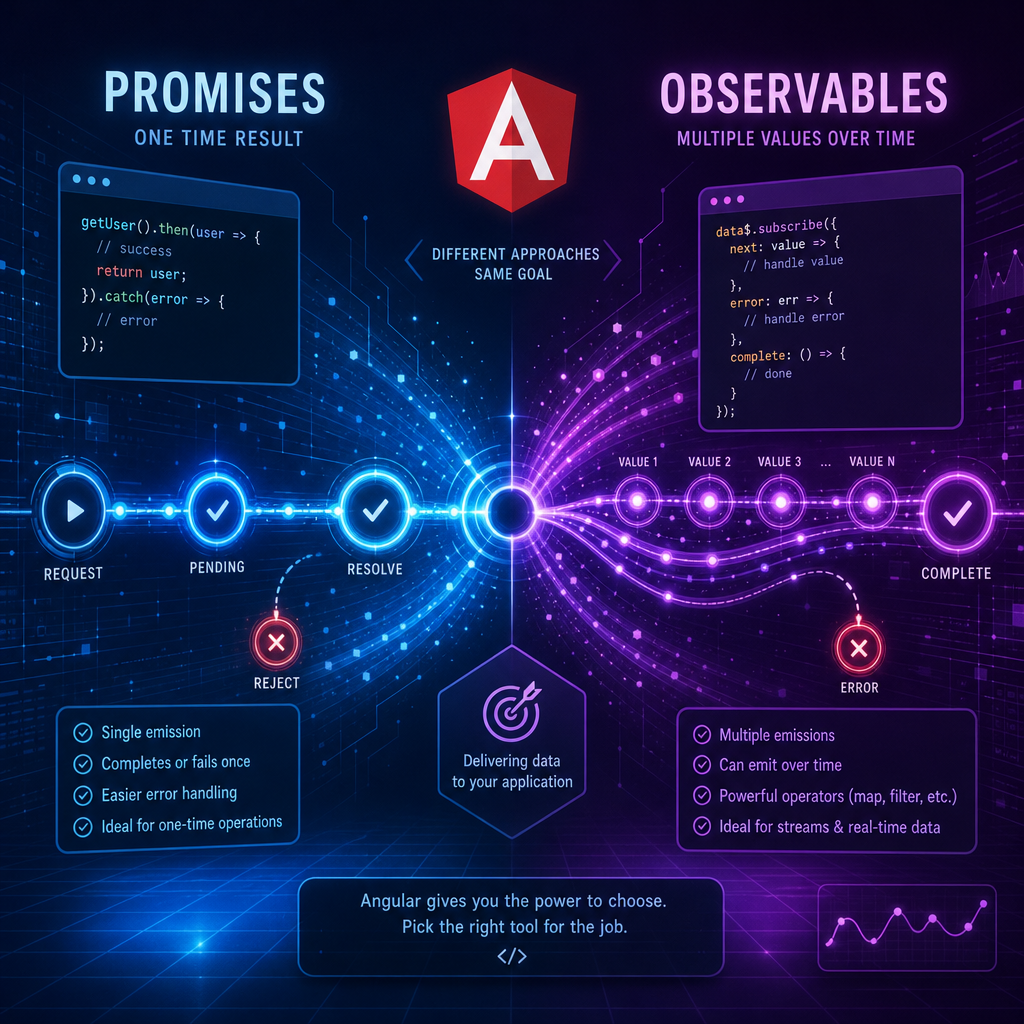
A Promise is a JavaScript object that represents the eventual completion (or failure) of an asynchronous operation and its resulting value. Promises are a part of the ES6 specification and are widely used for making HTTP requests. One of the properties of Promises is they are eager, meaning they initiate their operation right away.
const promiseExample = new Promise((resolve, reject) => {
  setTimeout(() => {
    resolve('Data fetched successfully');
  }, 2000);
});

promiseExample.then(result => {
  console.log(result);
}).catch(error => {
  console.error(error);
});
In this example, the promiseExample starts its operation immediately. After 2 seconds, it resolves to the string ‘Data fetched successfully’, which is then logged to the console through the then method.
Diving into Observables
Observables, on the other hand, are a part of the ReactiveX library and form the core of Angular’s reactive programming model. Unlike Promises, Observables are lazy and can handle multiple values over time. This makes them suitable for a stream of data like WebSocket streams or complex user interactions.
import { Observable } from 'rxjs';

const observableExample = new Observable(subscriber => {
  subscriber.next('First value');
  subscriber.next('Second value');
  setTimeout(() => {
    subscriber.next('Value after timeout');
    subscriber.complete();
  }, 2000);
});

observableExample.subscribe({
  next(x) { console.log('Received:', x); },
  error(err) { console.error('Error:', err); },
  complete() { console.log('Completed'); }
});
In the observable pattern described above, observableExample emits values whenever the next method is called. It waits lazily for subscriptions and doesn’t emit values until then.
When to Use Promises vs. Observables
While both Promises and Observables have overlapping use cases, their optimal usage scenarios diverge based on needs:
- Use Promises for single, async operations: They are ideal for basic operations, such as HTTP requests where you expect a single response.
- Use Observables for ongoing or multiple data emissions: Perfect for feature-rich scenarios such as continuous data streams or real-time event handling.
Angular’s HttpClient can seamlessly work with both, providing options that best fit your needs.
Reacting to Observables: A Real-World Example
In an Angular application, Observables provide a foundation for reacting to data. Let’s consider handling an HTTP request with observables using Angular’s HttpClient. We’ll make a simple get request to retrieve user data, reactively handling the response.
import { HttpClient } from '@angular/common/http';
import { Component, OnInit } from '@angular/core';

@Component({
  selector: 'app-user',
  template: `Name: {{ userData.name }}`
})
export class UserComponent implements OnInit {
  userData: any;

  constructor(private http: HttpClient) {}

  ngOnInit() {
    this.http.get('https://api.example.com/user/1')
      .subscribe(data => this.userData = data);
  }
}
This example showcases the power of Observables in Angular’s reactive forms and demonstrates how you can handle multiple scenarios with ease.
Performance and Best Practices
When opting for Promises or Observables, consider long-term maintenance and clarity of your code. Promises are usually simpler but are limited to one-time operations and error handling is bound to a single outcome. Observables, albeit more complex, bring the advantages of reactive programming and facilitate more dynamic use cases.
For performance optimization, it’s essential to unsubscribe from Observables to prevent memory leaks, especially in Angular components using lifecycle hooks such as ngOnDestroy.
Conclusion
Promises and Observables are both powerful tools in Angular, each serving different scenarios effectively. Embrace Promises for simpler, single-result operations, and Observables for handling streams of data, leveraging Angular’s built-in features for robust, reactive applications.
Useful links: