
Effective Error Handling in Python: Try..Except Mastery!
In the world of programming, effective error handling is crucial to building robust and reliable applications. Python, known for its simplicity and readability, offers powerful error-handling mechanisms through its try-except blocks. Mastering these can help make your code more resilient to unexpected situations and enhance user experience. In this post, we’ll delve deep into error handling in Python using try-except blocks, understand the various error types, and learn how to track error flow through illustrative coding exercises.
Understanding Python Exceptions
Python, like many other programming languages, uses exceptions to handle errors. An exception is an event that occurs during the execution of a program and disrupts its normal flow. Unlike bugs, exceptions occur as a consequence of external events beyond the program’s control—such as user input errors, attempting to open a non-existent file, or network timeouts.
Here’s a simple example of a division operation where an exception might occur if a division by zero is attempted:
try:
    result = 10 / 0
except ZeroDivisionError:
    print("You can't divide by zero!")
In this example, attempting to divide by zero raises a ZeroDivisionError. The try block contains the code that might generate an exception, and the except block catches and handles the specific exception.
Basics of Try-Except Blocks
The try-except mechanism in Python is invaluable for anticipating and handling errors without crashing your program. The structure is straightforward and involves wrapping the code in a try block, followed by one or more except blocks to handle specific exceptions:
try:
    # Code that may raise an exception
except SomeException:
    # Code to handle the exception
If the code in the try block encounters the exception specified, the flow is automatically transferred to the corresponding except block. For example:
try:
    num = int(input("Enter a number: "))
    print("The number is", num)
except ValueError:
    print("That was not a valid number.")
This code tries to convert user input into an integer. If a non-integer input is provided, a ValueError is raised, which the except block handles by printing a user-friendly message.
Using Finally and Else Blocks
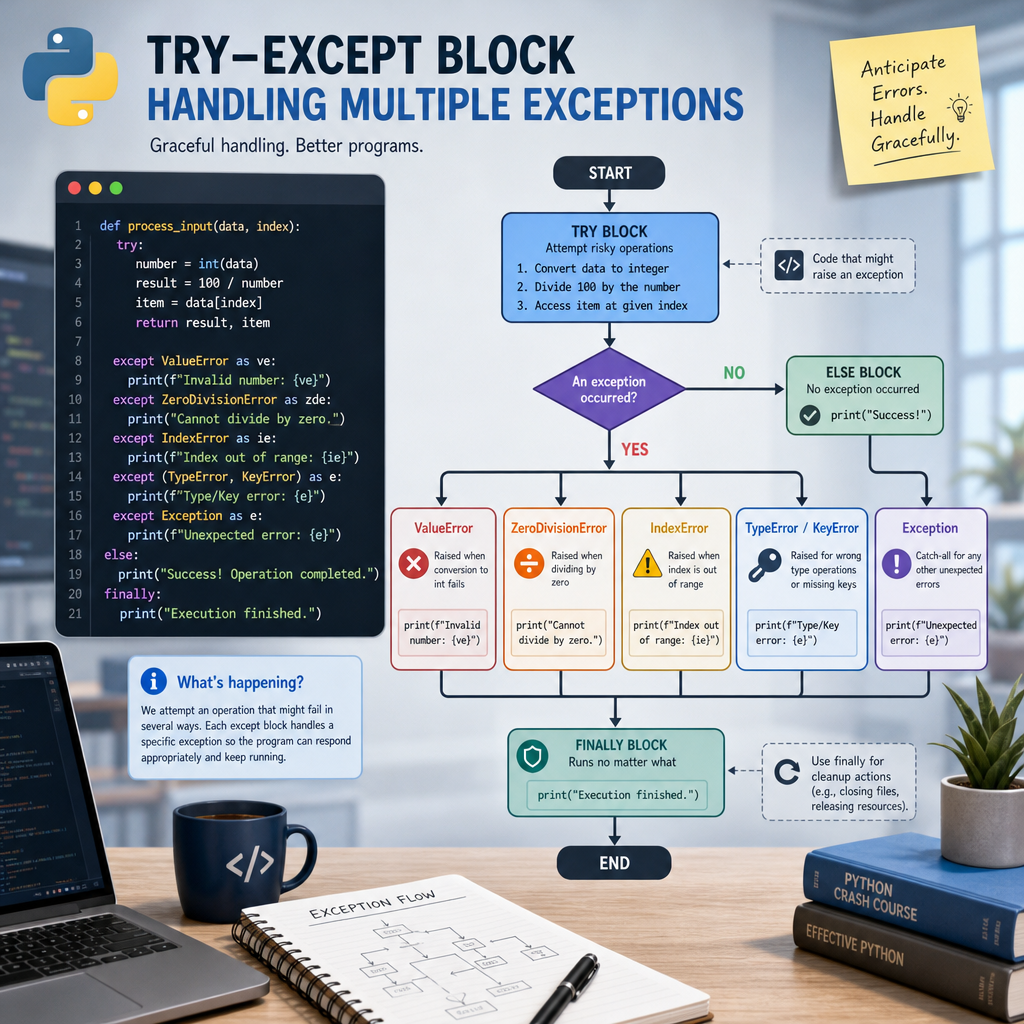
A try block can also optionally be followed by an else block and/or a finally block. The else block executes if the try block no exceptions occurred, while the finally block executes regardless of whether an exception occurred or not.
try:
    # Code that might throw an exception
except SomeException:
    # Handling code
else:
    # Executes when no exception occurs
finally:
    # Executes irrespective of exception occurrence
Consider the following example:
try:
    file = open('example.txt', 'r')
    data = file.read()
except FileNotFoundError:
    print("File not found.")
else:
    print("File content:", data)
finally:
    if 'file' in locals():
        file.close()
In this example, if the file doesn’t exist, the FileNotFoundError is caught, and the error message is printed. If no exception occurs, the file’s contents are printed. The finally block ensures that the file is closed whether an error occurs or not.
Catching Multiple Exceptions
Sometimes, a block may throw multiple exceptions. Python allows you to handle this elegantly by catching multiple exceptions in a single except block or by using multiple except blocks.
try:
    # A block that may throw different exceptions
except (TypeError, ValueError) as e:
    print("An error occurred:", e)
Or, using multiple except blocks:
try:
    # Some code
except TypeError:
    print("A TypeError occurred.")
except ValueError:
    print("A ValueError occurred.")
Handling exceptions separately when needed helps in applying specific recovery logic pertinent to each error type.
Built-in vs Custom Exceptions
Python comes with an array of built-in exceptions. However, sometimes built-in exceptions are insufficient for describing unique error types in your application. That’s when you define custom exceptions by subclassing Python’s Exception class:
class CustomError(Exception):
    def __init__(self, message):
        self.message = message
Use this custom exception in your code to signal domain-specific issues:
try:
    # Trigger custom exception
    raise CustomError("Something went wrong!")
except CustomError as e:
    print("Caught custom exception:", e.message)
Creating meaningful custom exceptions can significantly aid in identifying where specific logical errors occur in larger systems.
Conclusion
Understanding and implementing effective error handling with try-except blocks is an essential skill in Python programming. We’ve explored how to utilize try-except blocks, handle multiple exceptions, employ finally and else operations, and how to define our own custom exceptions. These techniques lead to more robust, readable, and maintainable code, ensuring a smoother user experience by catching unforeseen errors and providing informative feedback or fallback mechanisms.
Useful links: