
Pandas Transformations Simplified: Merging and Concatenating DataFrames
Pandas, a data manipulation library in Python, offers powerful tools for data manipulation and analysis. Among its most useful functionalities are merging and concatenating DataFrames, which are essential for combining datasets and performing complex data transformations. In this article, we will explore these operations in detail, providing practical examples that will help you understand how and why they work. We’ll also look into performance considerations and optimization strategies.
1. Understanding DataFrames: The Building Blocks
Before diving into merging and concatenating, it’s crucial to understand the basic structure of a DataFrame. In Pandas, a DataFrame is a two-dimensional, size-mutable, and potentially heterogeneous tabular data structure with labeled axes (rows and columns). It’s similar to a spreadsheet in Excel or a SQL table.
import pandas as pd

data1 = {
    'ID': [1, 2, 3],
    'Name': ['Alice', 'Bob', 'Charlie'],
    'Age': [25, 30, 35]
}

data2 = {
    'ID': [4, 5, 6],
    'Name': ['David', 'Eva', 'Frank'],
    'Age': [40, 45, 50]
}

df1 = pd.DataFrame(data1)
df2 = pd.DataFrame(data2)

print(df1)
print(df2)
Understanding the concept of DataFrames as basic entities helps us grasp more complex operations like merging and concatenating.
2. Merging DataFrames: Combining on Shared Columns
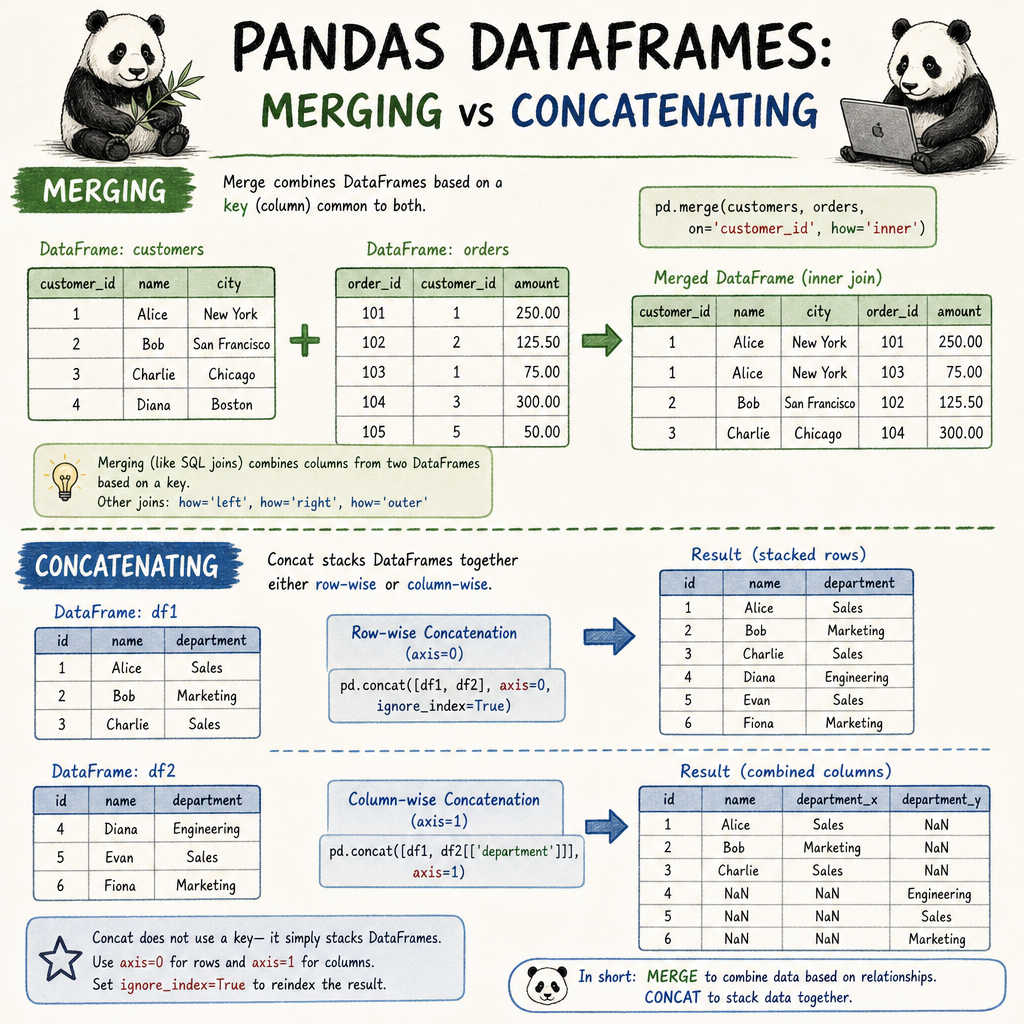
Merging two or more DataFrames involves combining them on common rows or key columns. This is akin to SQL joins and can be achieved using the merge() function in Pandas.
# Merging two DataFrames on the 'ID' column
df_merged = pd.merge(df1, df2, on='ID', suffixes=('_df1', '_df2'))
print(df_merged)
The above code merges df1 and df2 on the ‘ID’ column. If certain IDs don’t match, rows will be excluded by default (this is an inner join). Different types of joins are supported: left, right, outer, and inner.
3. Concatenating DataFrames: Stacking Vertically or Horizontally
Concatenation involves stacking DataFrames either vertically (adding more rows) or horizontally (adding more columns) using concat().
# Concatenating DataFrames vertically
df_concat_vertical = pd.concat([df1, df2], axis=0)
print(df_concat_vertical)

# Concatenating DataFrames horizontally
df_concat_horizontal = pd.concat([df1, df2], axis=1)
print(df_concat_horizontal)
When concatenating vertically, Pandas aligns the columns by their names. When concatenating horizontally, it aligns rows. Alignments and axis specifications are crucial to understanding how data is combined.
4. Use Cases and Performance Considerations
Consider DataFrames with millions of records, where both merge and concatenation operations could become inefficient. Pandas offer parameters like ignore_index or specifying index_col to improve performance.
# Optimized concatenation without re-building the index
df_concat_optimized = pd.concat([df1, df2], axis=0, ignore_index=True)
print(df_concat_optimized)
Real-world use cases of these operations include data cleaning, processing the results from a SQL database, and merging multiple CSV files into a single DataFrame for analysis.
5. Common Pitfalls and Best Practices
While merging and concatenating can be straightforward, their improper use might lead to unexpected results. It’s important to ensure column names don’t unintentionally overlap or cause data misalignment. Consider suffixes for columns that have similar names in different DataFrames.
Also, whenever large datasets are involved, it’s wise to test code with smaller samples to avoid long execution times or memory errors.
# Avoiding column overlap with suffixes
df_merged_suffixed = pd.merge(df1, df2, on='ID', suffixes=('_left', '_right'))
print(df_merged_suffixed)
By understanding the specifics of each method and applying due diligence while structuring data, you can optimize Pandas transformations beneficially.
In conclusion, by mastering the merging and concatenating of DataFrames, you unlock new possibilities in data manipulation, crucial for effective data analysis. Whether dealing with small datasets or performing operations on large data, these concepts form the foundation of many data processes in Python.
Useful links: