
Introduction to Asynchronous Programming in Python with Asyncio
Asynchronous programming is an essential paradigm in modern software development, particularly suited for I/O-bound tasks where waiting for external resources can substantially slow down an application. Python’s asyncio library provides robust support for this programming model, enabling developers to write concurrent code using the async/await syntax. This article explores how asynchronous programming works in Python using asyncio, complete with informative code examples and insights into coroutines, event loops, and concurrency patterns.
Understanding Asynchronous Paradigms
The primary goal of asynchronous programming is to perform multiple tasks simultaneously without waiting for each to finish sequentially. In Python, traditional synchronous code executes line by line, causing delays during I/O operations. Asynchronous programming, however, allows functions to ‘pause’ while waiting for a resource-intensive operation, enabling other operations to run concurrently.
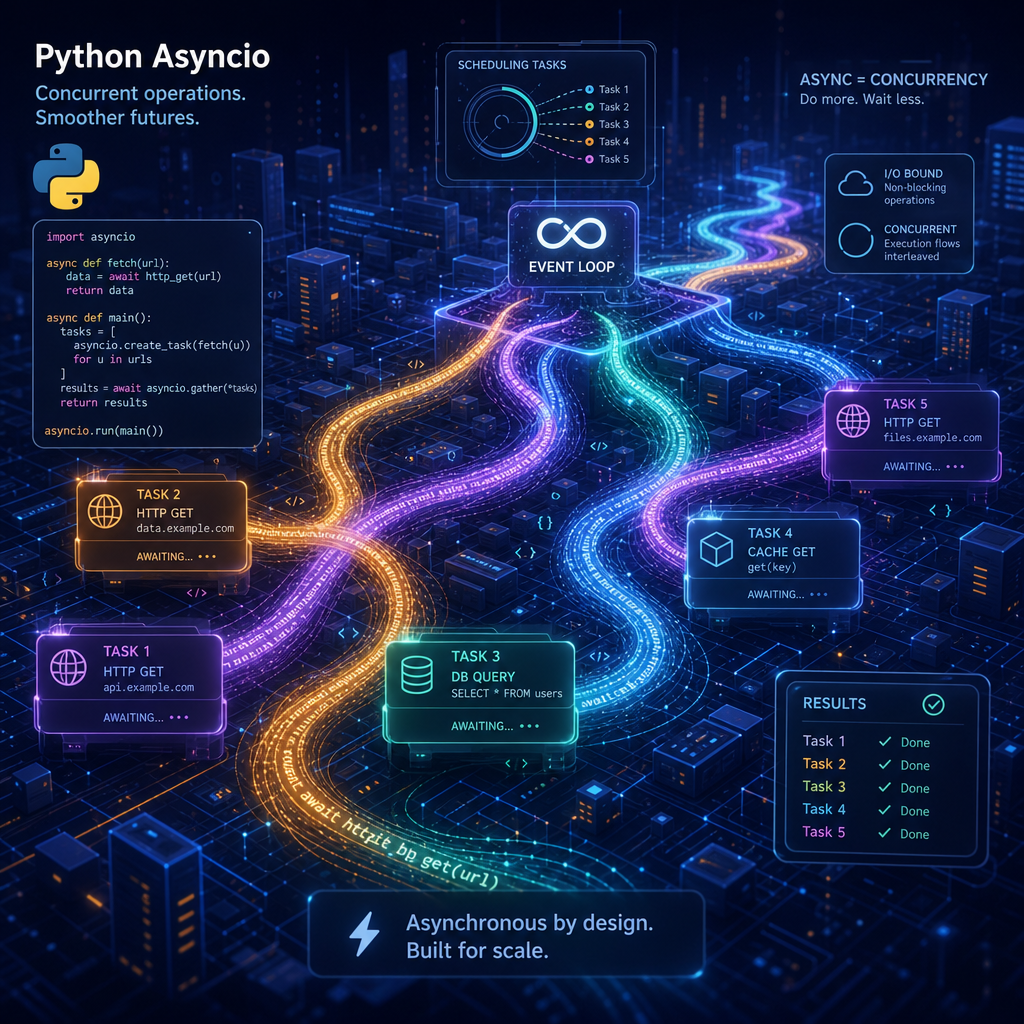
asyncio leverages coroutines, special Python functions defined with the async def keyword. These coroutines can be paused with await and resumed when needed, freeing Python to handle other tasks in the interim. This architecture is perfect for network requests, file operations, and any tasks that interact heavily with external systems.
Setting Up Asyncio
To begin using asyncio, you need to define coroutines and an event loop. The event loop continuously checks for completed tasks and executes corresponding callback functions, bridging function execution and asynchronous events.
Here’s a basic example demonstrating its setup:
import asyncio

async def say_hello():
    print('Hello')
    await asyncio.sleep(1)
    print('World')

async def main():
    await say_hello()

# Running the event loop
if __name__ == '__main__':
    asyncio.run(main())
The say_hello coroutine simulates an I/O operation using asyncio.sleep, illustrating how other tasks could execute during the pause. asyncio.run(main()) efficiently manages the event loop.
Coroutines in Detail
Coroutines are at the heart of asyncio. In practice, they often represent some work that needs to be done but can yield control to other coroutines, simplifying complex I/O flows.
Let’s extend our example with multiple coroutines:
async def fetch_data(url):
    print(f'Starting fetching from {url}')
    await asyncio.sleep(2)
    print(f'Finished fetching from {url}')
    return f'Data from {url}'

async def main():
    results = await asyncio.gather(
        fetch_data('https://example1.com'),
        fetch_data('https://example2.com')
    )
    print(results)

if __name__ == '__main__':
    asyncio.run(main())
This code fetches data from two URLs concurrently. asyncio.gather concurrently schedules both coroutine tasks. Once their I/O operations finish, results are collected, demonstrating concurrent network calls.
Working with Event Loops
The event loop is a core asyncio concept. It’s responsible for running asynchronous tasks, managing timeouts, and executing callbacks efficiently. As seen, invoking asyncio.run() initializes and executes the event loop. However, finer-grained control over an event loop can allow more complex orchestration.
Here’s how you could manage an event loop directly:
loop = asyncio.get_event_loop()
try:
    loop.run_until_complete(main())
finally:
    loop.close()
This direct manipulation of the event loop may be necessary for advanced functionality, like integrating with other event-driven frameworks or libraries.
Performance Considerations and Tips
When using asyncio, consider these best practices:
- Avoid blocking calls: Ensure all long-running operations within coroutines use
awaitto release control to the event loop. Blocking the loop can negate the benefits of asynchronous execution. - Use
asyncio.gatherwisely:asyncio.gatheris excellent for parallelizing tasks, but make sure task order and dependencies are considered to avoid race conditions. - Profile your code: Use profiling tools to identify bottlenecks in asynchronous execution to determine where optimizations can be applied.
- Leverage third-party libraries: Libraries like
aiohttpoffer compatibility withasynciofor HTTP requests and other protocols, enhancing performance in network-heavy applications.
Asynchronous programming using asyncio can drastically improve application responsiveness and resource utilization, particularly in environments with significant I/O wait times. By understanding and implementing the core concepts of coroutines and event loops, developers can ensure that their applications are optimized for modern computational challenges.
Useful links: